2. Toolchains
From one platform to many
For nearly fifty years, DataFlex has evolved alongside changing technology — from character-mode applications, to Windows, to the web — while keeping one thing constant: helping developers build business applications quickly and reliably, with minimal complexity.
Modern business applications are now expected to run across browsers, desktops, mobile devices, and cloud environments, with responsive interfaces, offline capability, and seamless synchronization. DataFlex is moving back onto all of those platforms through a concept called toolchains.
What is a toolchain?
A toolchain packages everything needed to build and run DataFlex for a specific target platform into a single unit:
- Compiler
- Runtime
- Debugger
- Core features
Each toolchain can be built for, and distributed to, a particular platform — Windows, Linux, macOS, and more. For Technical Preview 1, the first focus is the WebAssembly platform, which runs DataFlex locally in the browser.
Because each toolchain is self-contained, multiple DataFlex versions — their runtimes, compilers, and debuggers — can live side by side on one system, and most importantly within a single Studio.
New in DataFlex 27.0
In DataFlex 27.0 the toolchains were built completely from scratch: a new DataFlex runtime, an optimized compiler, and a new debugger. This new foundation prepares DataFlex for the next generation of application development while letting existing applications evolve gradually rather than requiring a rewrite. The TechStack focuses on:
- Cross-platform deployment
- Local application execution using WebAssembly
- Mobile application support
- Modern desktop applications
- Cloud-ready architecture
- Incremental migration paths for existing applications
Naming: TechStack and DataFlex Windows
Two names are used to distinguish the two generations of the platform:
- TechStack (also Technology Stack / TechStack Project) refers to the new, cross-platform DataFlex described here. This is the naming used for now, with an eye on the future.
- DataFlex Windows refers to the current mainline DataFlex.
The distinction is driven by where each one runs: mainline DataFlex only runs on Windows, while the future DataFlex — the TechStack — runs on all platforms given a suitable toolchain version.
Looking ahead, DataFlex will refer to the new TechStack platform rather than to DataFlex Windows. That is why the mainline was renamed to DataFlex Windows instead of inventing a separate, awkward name for the new runtimes: the well-known name DataFlex stays with the platform's future direction, and the Windows-only generation is qualified as DataFlex Windows.
DataFlex 27.0 ships both. The new TechStack is the major new direction of the release, and the current-generation runtime remains available through the Windows toolchain, which is an integral part of DataFlex 27.0.
One toolchain version, many platform builds
Toolchain technology lets multiple DataFlex platforms be maintained at the same time, including long-term support for DataFlex Windows.
A toolchain build is identified as <version>+<platform>-<arch> — for example 27.0.0+windows-64, which you can see selected in the Studio toolbar.
The two generations use different version schemes, on purpose:
- DataFlex Windows keeps counting up along the established mainline. In this release it is at 27.0 (
27.0.0), matching the DataFlex 27.0 release. - TechStack (the new DataFlex) starts counting from scratch — versions such as
0.1.x— to signify that it is brand new and independent of the Windows line.
This is where the earlier ambiguity resolves: DataFlex Windows runs only on Windows and ships as a single Windows toolchain (27.0.0+windows-64), while a single TechStack toolchain version — say 0.1.6 — has several platform builds, such as native and WebAssembly editions. The version identifies the toolchain; the build identifies the platform and architecture it targets.
Toolchain orientation
Previously, a project could only choose between the 64-bit and 32-bit DataFlex Windows platforms. That selector has been replaced: each project now selects a specific toolchain — either a TechStack toolchain or DataFlex Windows — from the Studio toolbar.
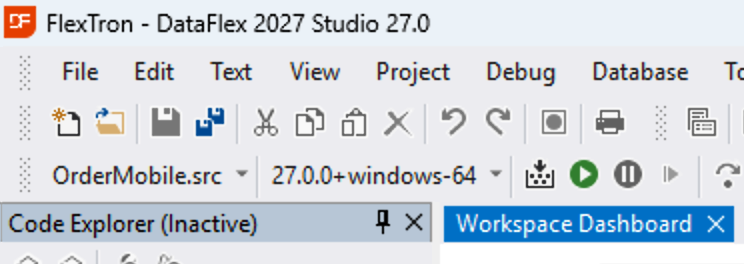
Each workspace has a toolchain preference: DataFlex Windows or TechStack. Data APIs are handled differently between the two, so the Studio needs to know which way to interact with your workspace. Mixing both within a single workspace is technically possible but not recommended.
Within a single flavor, individual projects can each use a different toolchain — and even a different toolchain version. For example, one workspace can hold a server-side project, a WebAssembly Web App Client, and a server-side process, each depending on a different TechStack toolchain and version. What the Studio needs is not a single shared toolchain across the workspace, but a single flavor: for the Studio (though not technically for compiling), a workspace should contain projects of one flavor — either DataFlex Windows or TechStack.
To keep the number of options manageable, the toolbar drop-down is filtered by the workspace's flavor: a DataFlex Windows–oriented workspace lists only DataFlex Windows toolchains, and a TechStack workspace lists only TechStack toolchains.
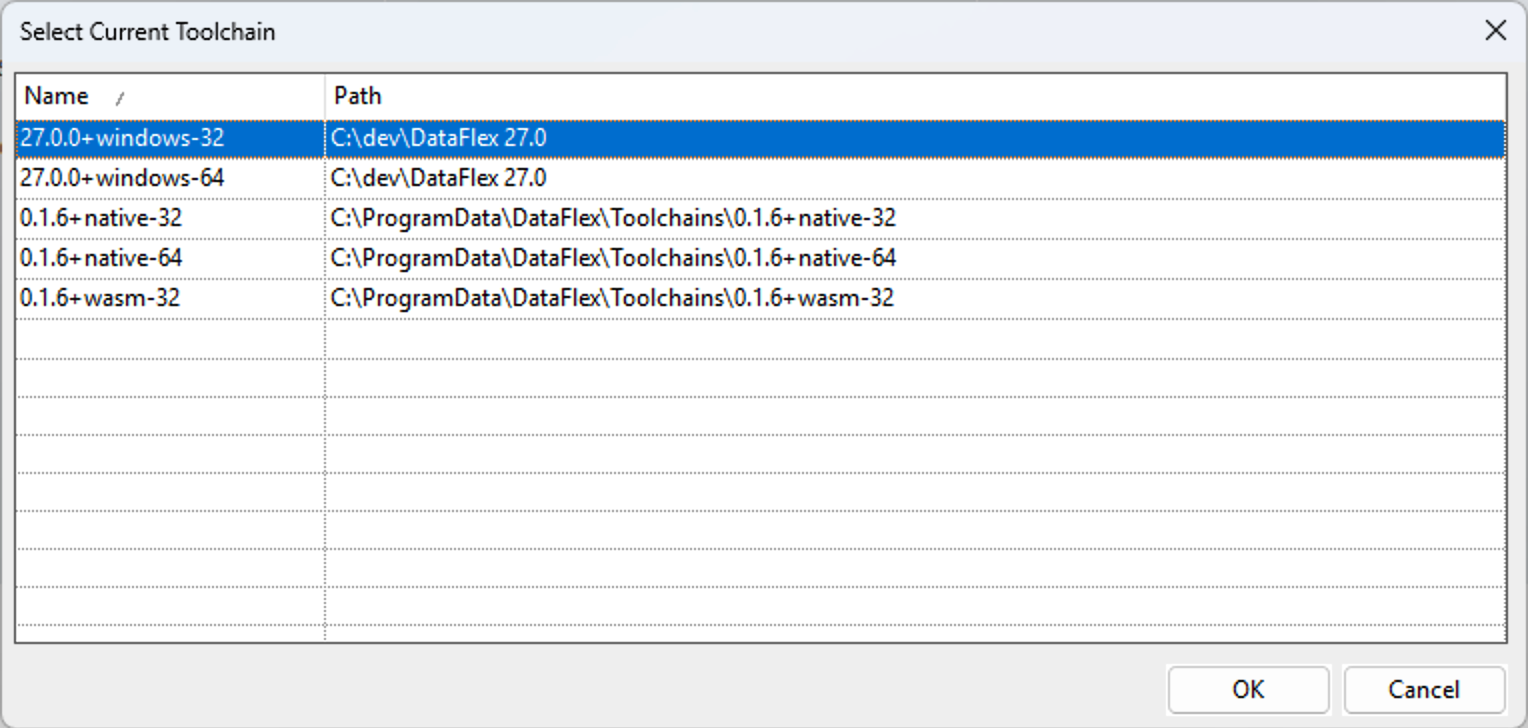
You can still force-select any toolchain on the system by choosing More toolchains… from the drop-down. This opens the Select Current Toolchain dialog, which lists every toolchain the Studio discovered on your system — by name (<version>+<platform>-<arch>) and install path.
Samples are tied to their toolchain in this preview
In the current preview, a sample cannot simply be switched to a different toolchain and compiled. The Windows UI sample is not yet supported on the TechStack, and even the Web UI / Server samples that this technical preview focuses on will not yet work by switching toolchains.
Instead, explore the TechStack–focused samples directly, or build a new TechStack project from scratch as far as is currently possible.
Toolchain installation locations
To preserve backwards compatibility, DataFlex Windows installations continue to work exactly as they do today. DataFlex Windows has many references spread throughout the system — Program Files, the registry, and the Data Access Worldwide directory in ProgramData.
TechStack introduces a single new cross-platform DataFlex directory in ProgramData (C:\ProgramData\DataFlex) to hold all future DataFlex components in one place rather than spread around the system. DataFlex 26.0 already introduced this directory — the package cache (C:\ProgramData\DataFlex\Packages\Cache) was the first component to use it. The directory now holds separate components side by side: toolchains (C:\ProgramData\DataFlex\Toolchains) and package caches, with tooling planned to follow. Keeping the installation surface in one place, rather than spread across the system, keeps it minimal and improves cross-platform compatibility.
Toolchains also appear as installer entries in Windows, so you can install and uninstall them on the fly. The bundled toolchains are always auto-installed the first time you install the 27.0 Studio, so you have a working set available out of the box.
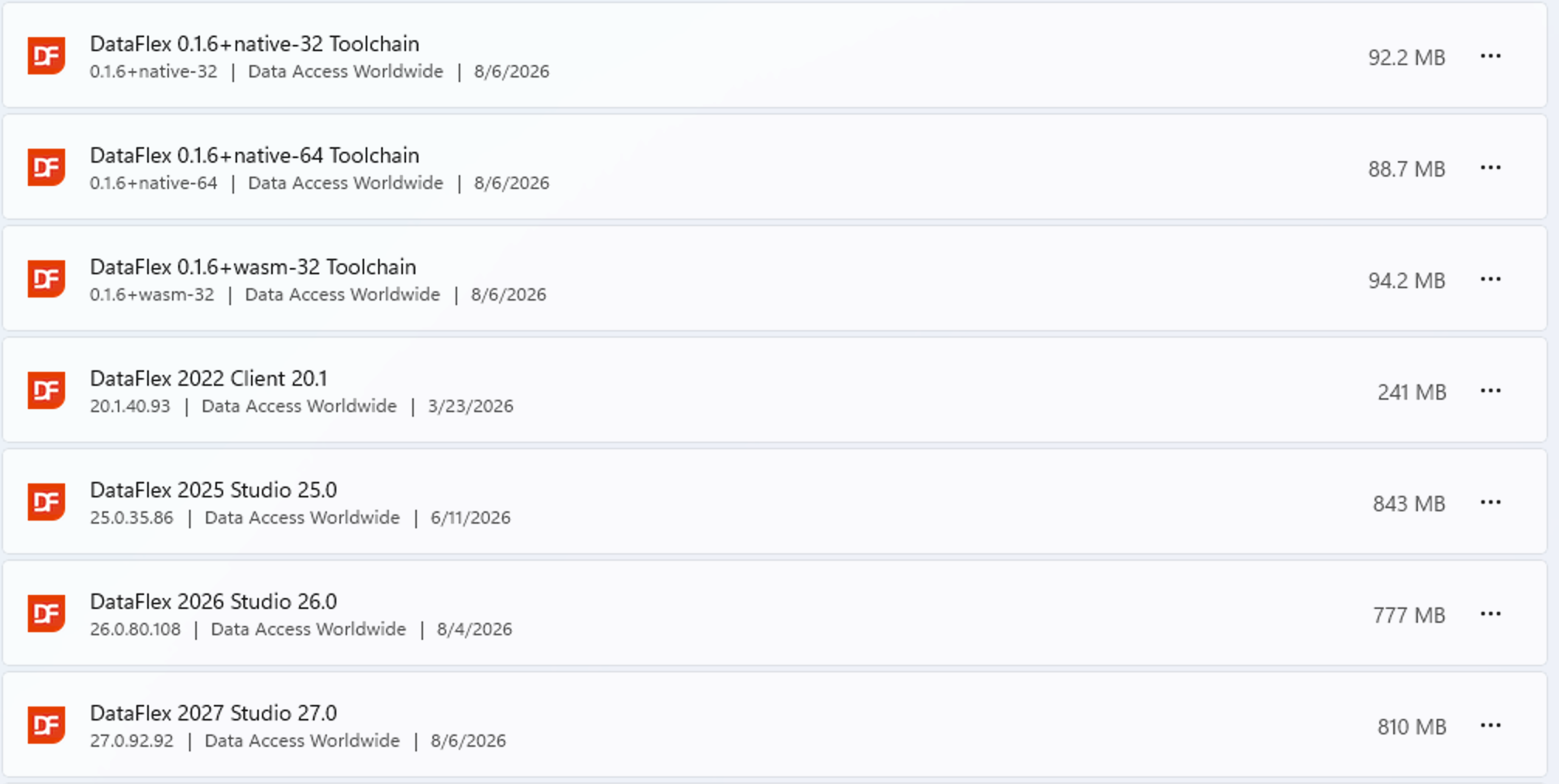
These installer entries currently use the registry. Going forward, df-cli — the DataFlex build system — will manage toolchain installations directly, without requiring registry entries, and will arrive in the Technical Preview soon. At that point a toolchain is nothing more than a directory.
Studio changes are kept to a minimum, so you can install updated toolchain installers on their own. New toolchain installers are made available every month with new features, bug fixes, and other improvements.
Preview program note
The TechStack is under active development and is intended for exploration, testing, and feedback. For production applications, use the current stable DataFlex release.
See next: 3. Creating a new project.